
One strong master password, unique passwords for everything else. A password manager makes that achievable for any team.
Imagine An employee at a financial advisory firm regularly stores passwords on his work computer. They give access to sensitive financial data. The computer is insufficiently secured, so an unauthorised user can easily get to that information. The result: considerable damage for the employee, the company and its clients.
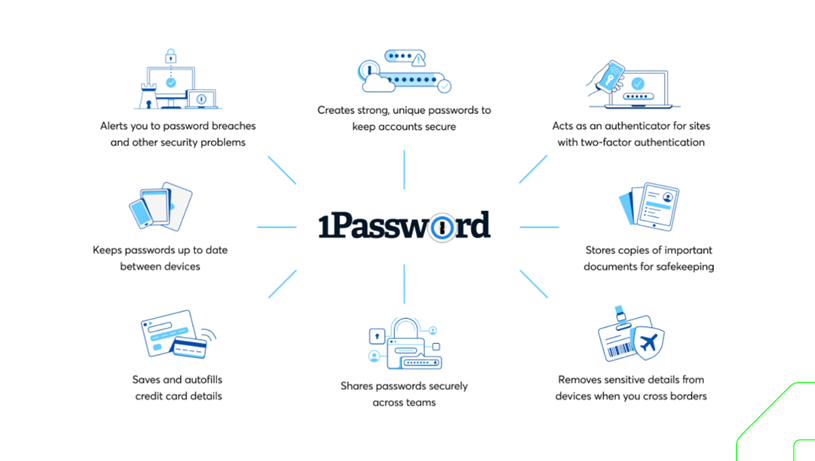
A password manager could have prevented that damage. It lets you manage passwords centrally and securely: use strong, unique passwords, store them safely, share them and revoke them when needed. That considerably reduces the risk of harmful data breaches.
In 2023, a hacker needed only two weeks to crack a 10-character password with numbers, upper- and lowercase letters and symbols. An 8-character password is cracked in five minutes. If the password consists of 11 digits, it takes less than a second.
From the field We recently spoke with a software start-up that didn't use a password manager for its Macs. One developer used a single 10-character password for several internal systems. He thought that was secure enough, until an outside attacker cracked it and gained access to all internal systems, including the source code and sensitive company data.
If you leave password management to individuals, risks quickly arise. People underestimate how fast a hacker gets in. They choose weak passwords that are easy to remember, or use the same password for several accounts. And those who do use strong, different passwords often store them in the browser, in a document or in notes.
A password manager generates unique, strong passwords for all your accounts and stores them encrypted in a digital vault. Thanks to hashing, the original password can't be reconstructed, not even if the password manager itself is hacked.
The password manager locks automatically after a short period of inactivity. Unlocking it requires one super-strong master password with two-factor authentication. Employees don't have to remember complex passwords, and unauthorised people can't get in, even if the computer is stolen or hacked.
From the field We implemented a password manager at a consultancy firm. The IT administrator could immediately see which employees used weak passwords, and those were strengthened right away. We also set fixed rules, such as mandatory two-factor authentication for all accounts. On top of that, the company now centrally manages who has access to which data, and can revoke that access immediately when someone leaves.
There are several business solutions, such as 1Password for Business, Dashlane and LastPass Business. They offer multiple user accounts, secure password sharing and reporting for administrators, among other things.
Compare the options thoroughly, choose a reliable password manager and set up strict access control.
At Hi-T we choose 1Password. We use it ourselves and recommend it to our clients.
In short
An 8-character password is cracked in minutes One strong master password with 2FA, unique passwords for the rest Central management spots weak passwords and revokes access instantly
The information in this article is intended as general knowledge about using Apple products in a professional environment. Your organisation may have its own policies that restrict certain features or software. Always consult your organisation's IT policy before changing anything on company hardware or software.