
Macs may be more secure, but malware attacks on Macs are increasing. That's why it matters to install anti-malware on your Mac.
Imagine You run a fast-growing company that works with Apple. You don't need anti-malware, you think. Until your IT department reports that all your Macs are infected with malware. It's discovered quickly and the damage stays limited, but it was a close call.
You're not the first to become overconfident because of Apple's good reputation. It even happened to Facebook in 2013. Many employees used a Mac without anti-malware. When a few of them visited a compromised website, their devices were infected and the malware spread through the company network. A month later, Apple itself was hit by the same malware.
Apple has a reputation for being very secure. Many users therefore think they're protected against malware simply because they use a Mac. That isn't entirely true.
Apple invests heavily in security, with built-in measures such as Gatekeeper, XProtect, System Integrity Protection and the App Store. Still, no system is immune. Recent examples: the Shlayer trojan, which hit one in three Macs in 2019 and accounted for 30% of attacks on Macs between 2018 and 2020, the Silver Sparrow attack (2021) on the then-new M1 chips, and Adload (2019 to 2023), which spread through browsers and fake updates.
Malware is short for malicious software. The first viruses in the 1970s were more like jokes and experiments. Today malware is a weapon criminal groups use to cause enormous damage, think of WannaCry and NotPetya (2017). Malware comes in many forms: viruses, worms, trojan horses, ransomware, spyware, adware, rootkits, botnets and keyloggers. The goal is almost always the same: stealing data and money.
According to AV-Test, an independent German IT security organisation, over 1.3 billion pieces of malware and potentially unwanted applications (PUA) were registered in 2023. Only 0.14% of them targeted macOS, compared to 84% targeting Windows.
| Platform | Malware | PUA | Total | Share |
|---|---|---|---|---|
| Windows | 939,371,316 | 189,117,483 | 1,128,488,799 | 84.37% |
| Apple | 938,416 | 941,357 | 1,879,773 | 0.14% |
| Other | 170,878,906 | 36,371,306 | 207,250,212 | 15.49% |
| Total | 1,111,188,638 | 226,430,146 | 1,337,618,784 | 100% |
Source: AV-Test, 2023 figures.
There is nuance, though: since 2015 the amount of new macOS malware and PUA has risen quickly.
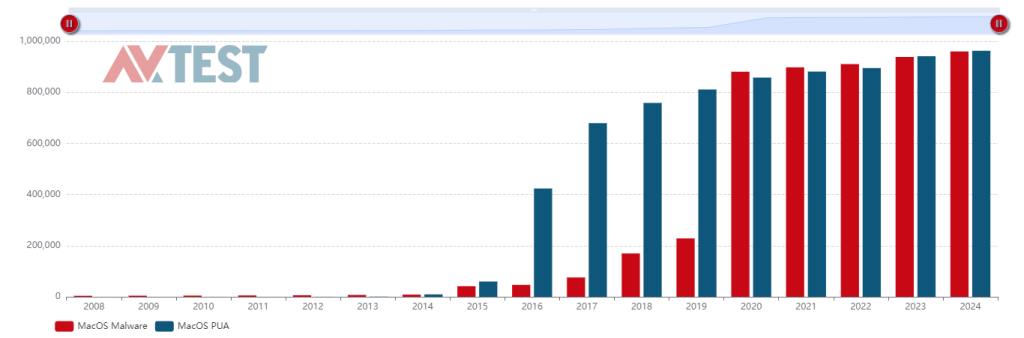
You'll find more figures on AV-Test's AV-Atlas. The share of attacks on Macs is still small, but it's growing. New regulation such as the EU's Digital Markets Act, which allows alternative app stores, also increases the risk of unsafe apps.
Malware can reach your device through emails, websites, USB sticks, external drives, ads and software. Despite Apple's measures, it's best to take steps yourself too:
Classic anti-malware, such as a virus scanner, only recognises malware that's already known. EDR and XDR analyse the behaviour of processes on your computer in real time, using machine learning. That way they also recognise unknown and complex threats, and offer better protection against new, targeted attacks.
A Mac is more secure, but not invulnerable. With these four steps you're already off to a good start in protecting the Macs in your company.
In short
Shlayer hit one in three Macs in 2019 Even Facebook and Apple itself were hit EDR also recognises unknown threats
The information in this article is intended as general knowledge about using Apple products in a professional environment. Your organisation may have its own policies that restrict certain features or software. Always consult your organisation's IT policy before changing anything on company hardware or software.